

If you are working out how to choose HR software, most checklists are built to lose you.
You know the drill. You open a comparison spreadsheet, list twelve tools down the side and forty features across the top, and start filling in checkmarks. The tool with the most checkmarks wins. You sign, you roll it out, and six months later half the team still runs reviews in a Google Form because the tool never matched how they actually work.
The checkmarks were never the problem. Fit was.
This is the part the checklists bury. They compare feature counts, integrations, price. "Does this fit how our team works" gets one line near the bottom, if it shows up at all, filed under "customization options." But that line is the whole game. It decides whether anyone actually uses the thing once you've paid for it. (If you're still deciding whether you even need a new tool, that's a separate question, and it's worth settling first.) Get it wrong and you've bought an expensive system that slowly shapes your process around itself, until working around it is easier than working with it.
The numbers back the frustration up. In a 2024 Gartner survey, only 24% of HR leaders said their function draws maximum value from its HR technology. Just 35% were confident their current approach was helping the business hit its goals. Two out of three believed their function would get less effective if they didn't change something. Features aren't the gap. The gap is tools that don't fit the teams using them.
So this guide asks a different question than most. Not "which tool has the most features," but "which tool fits how our team already works." The five questions below get you there. Take them into every demo.
Five questions that predict whether a tool will fit
Before the feature list, before the price, these are the questions that tell you whether a tool fits your team or your team has to fit itself around the tool:
- Does it build from the roles and competencies we already have, or from its own library we'd adapt to fit us?
- When we go live, who does the setup, us, a paid implementation, or you with us?
- Show me how I'd change a review cycle's length, its questions, and who sees the results, after it's set up.
- What changes for us when our process changes, mid-cycle or next quarter?
- What does it cost when we add a module or grow the team?
Three ideas sit underneath these five, and the rest of this guide is how each one works.
The question the checklists skip
Here's something worth knowing before you start shopping: almost every serious tool can be customized. So "can it be customized" isn't a useful question. The answer is always yes. The useful questions are about how, and by whom.
That's where tools actually differ, and where a generic checklist goes quiet. Three questions separate a tool that fits your team from one your team ends up fitting itself around:
- Where does the setup come from?
- Who does the shaping work?
- Can you change how a feature works without breaking your process?
These rarely appear on a standard evaluation checklist. All three predict, better than any feature count, whether the rollout works. Here's how to use each one.
Question 1: Where does the setup come from?
Every tool has to build your workflows from something, whether that's onboarding, absences, or a review cycle. Where it starts is the single biggest predictor of how much of your first quarter you'll spend on setup, and not many ask about it.
Two starting points are common. One is the tool's own library: a ready-made competency framework, a default set of review questions, a standard org structure. The other is your own setup: the roles you actually use, the way your teams are grouped, the competencies that matter for your engineers versus your salespeople. Same destination, but a very different amount of work to get there.
The difference shows up after you sign. When a tool starts from a generic library, every gap between the template and your reality is something you close by hand: mapping, renaming, adjusting. When it starts from the structure you already have, there's far less to retrofit, because it was built on your setup in the first place.
A library isn't a bad thing in itself. If your process is still forming, a ready-made default is a reasonable place to start. But if you already know how your team works, a generic template is mostly work you'll have to undo. The closer the starting point is to your own structure, the less setup work you're left with.
Ask it directly: does this build from the roles and competencies we already have, or from its own library we'd adapt to fit us? And if it's a library, how much of the adapting lands on us?
Question 2: Who does the setup work?
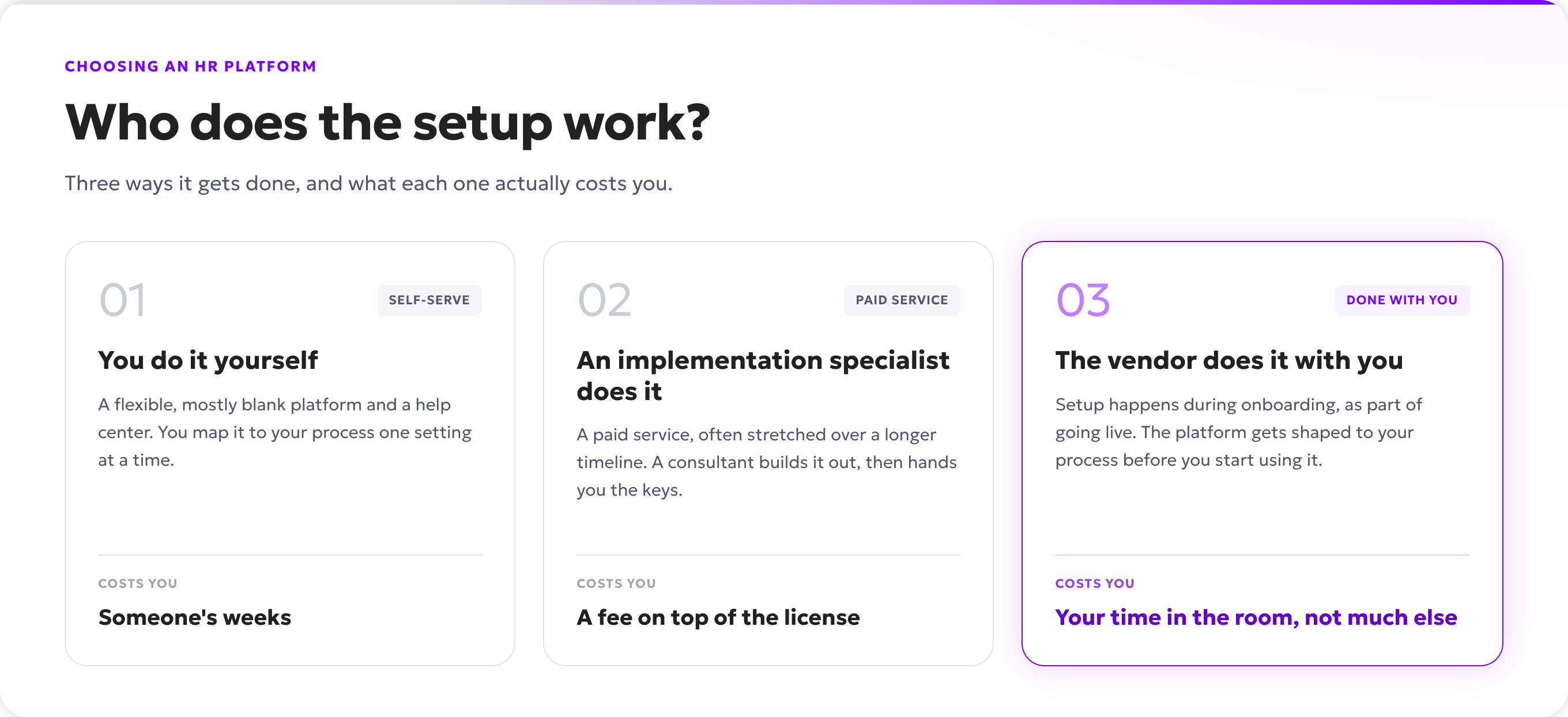
Then the obvious follow-up: who actually does that work? Three ways this usually goes. Know which one you're signing up for before you sign.
You do it yourself. The tool gives you a flexible, mostly blank platform and a help center. Everything is configurable, which is genuinely useful, but configurable also means someone has to configure it, and that someone is you or a colleague with time to spare.
An implementation specialist does it. The vendor sets it up for you, usually as a paid service and often over a longer timeline. This is a solid route when the process is complex, and it's common at the enterprise end, where implementations can run several months and carry a cost close to the software itself. Good to price in early so it isn't a surprise later.
The vendor sets it up with you as part of going live. The shaping happens during onboarding rather than as a separate project. You work through it together, the tool gets built around how your team runs, and you're live with it already fitting.
Which one fits depends on what you have. A large organization with a dedicated HR ops team and a budget for consultants can absorb either the DIY route or a paid implementation. A team of fifty to five hundred usually can't spare a person to run setup for weeks, and doesn't want to pay enterprise implementation fees to make the tool usable. For that size, setup done with you is what gets you live in weeks rather than half-configured a quarter later. The question isn't which model is best in the abstract, it's which one matches the time and people you can actually give it to.
Ask it directly: when we go live, is fitting this to our process something we do, something we pay extra for, or something you do with us?
Question 3: Can you change how a feature works without breaking your process?
The first two questions are about setup. This one is about the year after, when your process shifts and the tool has to keep up. And it will shift. You'll want a different review cadence for one team than another, or to adjust who sees what, or to decide a cycle should run four weeks instead of six. The useful thing to check is whether you can make those changes yourself, later, without help.
Most buyers never test this one, and it's the one that quietly costs them later. Say you wanted metric-based reviews. In the tool, they turn out to be fiddly to set up, so you switch to descriptive ones because that's the path of least resistance. It feels like a choice at the time, but the tool made it for you. When a system locks how long a cycle runs, how many questions you can ask, or who sees the results, it ends up shaping your process instead of the other way around, and you often don't notice until you're already working around it.
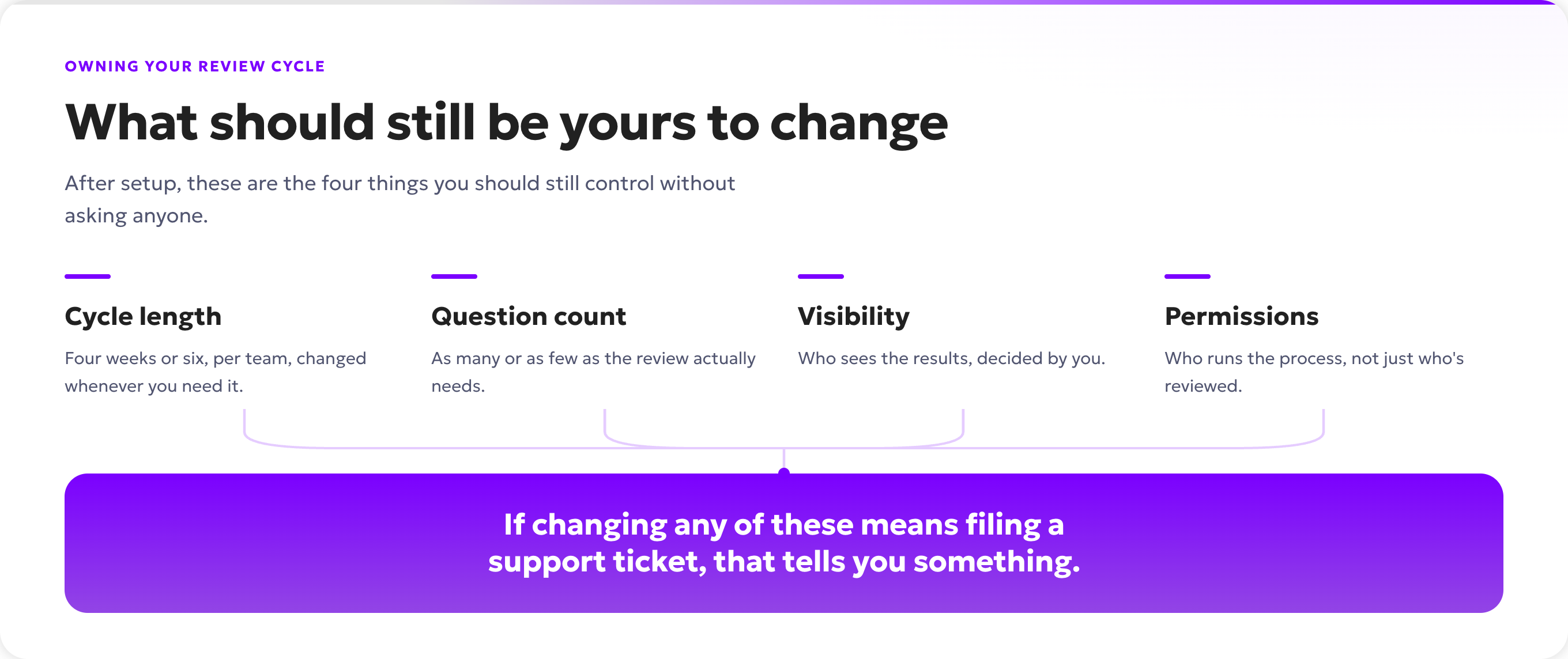
So the real test of fit isn't whether a feature exists, but whether you stay in control of how it works: the cadence, the question count, the visibility, the permissions, and whether you can change them later when your team changes.
One honest boundary, because it cuts both ways. Fitting a tool to your process means controlling what happens inside a feature. It does not mean a vendor should build you a brand-new module on request, that's custom development, and a tool that promises to build anything for anyone rarely holds up as it takes on more clients. Real fit is deep control over what's already there. A vendor who's clear about that line is being straight with you, and that's a good sign.
So don't ask whether the feature exists. Ask to see it move: show me how I'd change a review cycle's length, its questions, and who sees the results after it's already set up. If that's a setting, good. If it's a support ticket, you have your answer.
The other things worth checking
Fit is the spine. It isn't the whole skeleton. A handful of practical things still earn a column in your comparison, as long as you weigh them honestly instead of letting a long feature list think for you.
Coverage across the employee lifecycle. A tool that handles the stages around reviews, onboarding, 1:1s and development, absences, engagement surveys, offboarding, and hiring saves you from splitting a person's history across systems. Their review, their development plan, and their day-to-day admin stay in one profile instead of a review in one tool and the follow-up in a spreadsheet, and it connects to the systems you already run where it needs to. Useful, but treat it as a convenience that compounds.
Security and compliance. Non-negotiable for HR data. Ask where the data is stored, how GDPR is handled, and who can see it. You want specific answers, not reassurance.
The support model. Support is easy to skim past until a cycle is live and something breaks. Ask what it actually looks like at that moment. Is there a real person who knows your setup, or a chatbot and a queue? A named contact who stays with you past onboarding is worth more than a long help center.
What it costs as you grow. The sticker price is rarely the real price. Ask what happens when you add a module, add users, or move up a tier. A tool with clear, predictable pricing you can reason about beats one where every expansion means a new negotiation. This is a fair place to ask directly what a second or third module costs, and to expect a straight answer.
Weigh these, but don't let them outvote fit. A tool can pass every one of them and still be the wrong buy, because a tool your team works around is a tool nobody really uses.
Take these into every demo
You've seen why these five matter. Keep them in one place and take them into your next demo. The answers tell you more than any feature list will. A tool that builds from your setup, does the shaping with you, and leaves you in control of how each feature runs is a tool that fits how your team already works. One that starts from its own template and hands you the adapting is a tool your team will spend the next year fitting itself around.
Where Kadar fits
These three questions are the ones Kadar was built to answer.
Reviews, 1:1s, development plans, and career paths build from the roles and competencies you've already set up, not a library you adapt your team to fit. The setup happens with you while you go live, not as a bill on top of the license or a job left on your desk. And the settings that decide whether a tool quietly reshapes your process, cadence, questions, visibility, permissions, stay yours to change when your team changes. The rest of the lifecycle sits in the same place, so a person's review and everything around it stops living in separate tools.
If your current tool doesn't fit how your team actually works, that's the conversation worth having, before you sign anything.
Book a call and we'll walk through how Kadar would fit the way your team already runs its process. Bring the five questions. They're good ones to ask us too.